
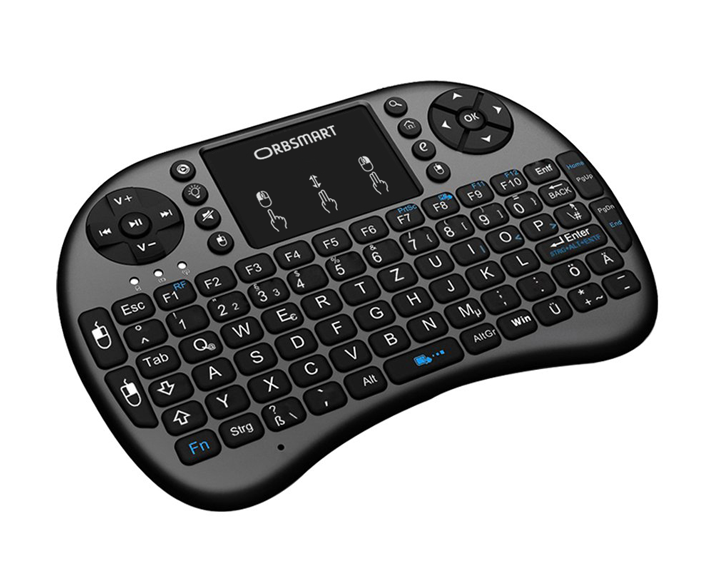
AM-2 – Wireless Mini Keyboard (German QWERTZ) with Multi-Touchpad, LED Backlight & Battery
Control your Mini PC, HTPC, Raspberry Pi, or Android TV box comfortably with both hands from the sofa: The AM-2 combines a compact keyboard, a responsive multi-touchpad with gesture control, switchable LED key backlighting, and a long-lasting rechargeable Lithium-Ion battery in an ergonomic handheld housing.
This model is manufactured exclusively with a German keyboard layout (QWERTZ). Compared to English QWERTY keyboards, the Y and Z keys are swapped, and dedicated keys for German umlauts (Ä, Ö, Ü) are printed on the keypad.
Highlights at a glance
Large Multi-Touchpad
Navigate just like on a laptop: featuring 1-finger left click, 2-finger right click, and smooth 2-finger scrolling.
German QWERTZ Layout
Full German keyboard layout (including Ä, Ö, Ü, F1–F12 keys & multimedia shortcuts) for fast two-thumb typing.
LED Backlight & Battery
Switchable key backlighting for darkened rooms and a rechargeable Li-Ion battery for weeks of runtime.
Mouse & keyboard ergonomically combined
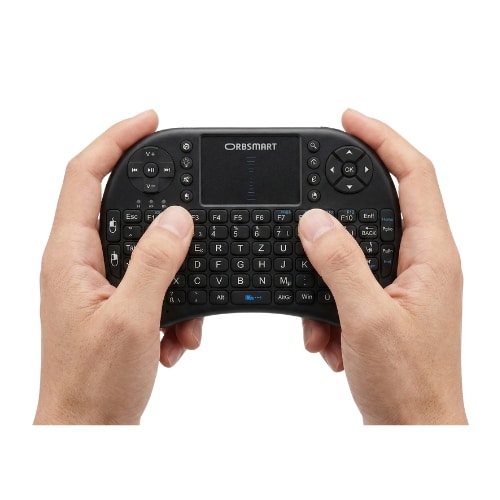
Say goodbye to bulky desktop keyboards on your coffee table: The AM-2 combines a full PC keyboard, a touchpad, and dedicated multimedia buttons in a lightweight 110-gram housing. Thanks to its ergonomic, gamepad-inspired shape, it rests securely in both hands so you can reach all keys and the touchpad effortlessly with your thumbs.
Smart multi-touchpad with gesture control
The centrally positioned touchpad replaces a separate mouse entirely and supports intuitive multi-touch gestures: Tap with one finger for a left click, tap with two fingers for a right click, or drag two fingers vertically across the pad to scroll smoothly through websites and menus like a mouse wheel. In addition, dedicated physical left and right mouse buttons are also integrated directly into the housing.

Backlit German QWERTZ layout
The AM-2 features a complete German QWERTZ keyboard layout (including Ä, Ö, Ü, Ctrl, Alt, and F1–F12) as well as convenient shortcut buttons for volume, mute, web browser, and media playback. Thanks to the switchable LED backlight, you always find the right key even in a darkened home cinema or during presentations.

Rechargeable Lithium-Ion battery
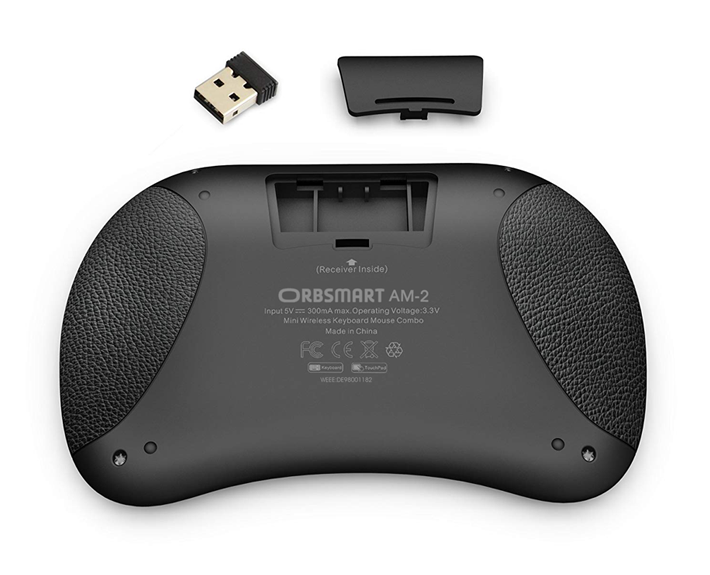
No disposable batteries needed: Inside the rear compartment of the AM-2 sits a long-lasting Lithium-Ion battery that runs for weeks under normal use. An automatic sleep mode switches off the backlight and wireless link during inactivity to save energy until you press any key again. Recharging is done easily via the included USB cable.

100% Plug & Play via 2.4 GHz wireless
Simply take the tiny USB nano receiver out of the storage slot under the rear cover and plug it into a free USB port. The AM-2 is recognized immediately without any driver installation and transmits reliably up to 10 meters away – ideal for Windows Mini PCs, Linux, Raspberry Pi, Android TV boxes, media players, Smart TVs, and game consoles.

Technical Specifications
Buying Guide & Pre-Sales Questions
What does “German QWERTZ Layout” mean for international users?
When is the AM-2 (Touchpad) better than an Airmouse (AM-1 / WA-1)?
• AM-2 (this model): Ideal if you frequently type text, URLs, or terminal commands (e.g., on a Windows Mini PC, Linux/Raspberry Pi, or web browser) and prefer controlling the cursor with your thumb on a classic laptop-style touchpad (including dedicated F1–F12 keys).
• AM-1 / AM-1 Pro / WA-1: Ideal if you prefer a slim, one-handed TV remote form factor where the mouse cursor is controlled by moving the remote in the air.
Where is the USB wireless receiver located upon delivery?
Do I need to install drivers on Windows, Linux, or Android?
Practical Tips & Knowledge Base
Quick help with keyboard layout settings, touchpad gestures, backlighting, and pairing.
Why are Y and Z swapped when typing on Android?
With the USB receiver plugged in, go to Settings → System / Device Preferences → Languages & Input → Physical Keyboard and select “German”.
How do I toggle the LED backlight and adjust touchpad cursor speed?
- Toggle backlight & change color: Press Fn + F2 to turn the LED backlight on, cycle through the backlight colors (Blue / Green / Red), or switch it off.
- Adjust cursor speed (DPI): Press Fn + Spacebar to adjust the sensitivity of the touchpad.
Overview of multi-touchpad gestures
- Left click: Tap once on the touchpad with one finger (or press the physical left mouse button).
- Right click: Tap once on the touchpad with two fingers simultaneously (or press the physical right mouse button).
- Scroll (mouse wheel): Drag two fingers simultaneously up or down on the touchpad.
How do I re-pair the AM-2 with the USB receiver?
- Unplug the USB receiver from your PC / TV box and switch the AM-2 on using the power slider at the top edge.
- Press and hold Fn + F1 simultaneously until the blue status LED flashes rapidly (pairing mode active).
- Plug the USB receiver back in and hold the keyboard close to the receiver. Once the LED stays solid, pairing is complete.

