
WA-1 – Wireless Windows 10 & 11 Airmouse with Backlit German QWERTZ Keyboard
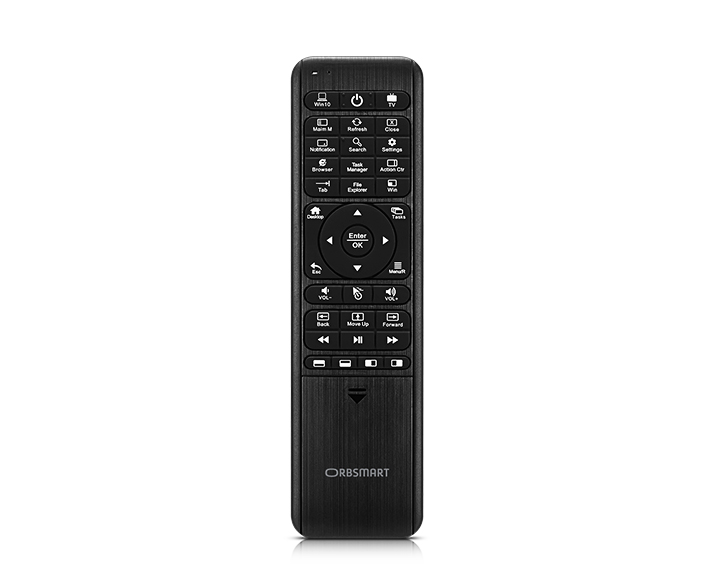
Say goodbye to bulky mice and keyboards on the couch: The WA-1 is the compact command center for your Windows PC, Mini PC, or HTPC on the big screen. Specifically tailored for Windows 10 & 11, it combines a precise 6-axis airmouse, dedicated Windows shortcut keys, and a double-sided backlit keyboard in a single device.
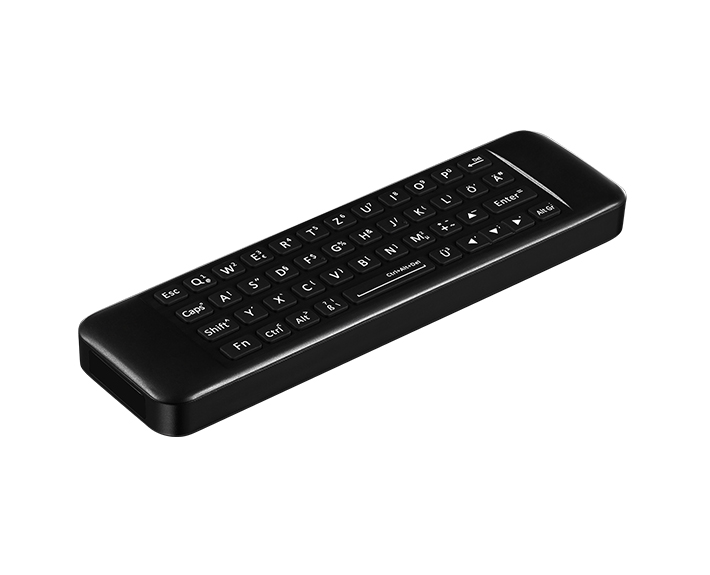
This model is manufactured exclusively with a German keyboard layout (QWERTZ). Compared to English QWERTY keyboards, the Y and Z keys are swapped, and dedicated keys for German umlauts (Ä, Ö, Ü) and punctuation are printed on the back.
Highlights at a glance
Windows Special Keys
Instant one-click access to Windows Explorer, Desktop, Search, Web Browser, Task Manager, and Close Window (Alt+F4).
Backlit QWERTZ (DE)
Full German mini keyboard on the back with switchable LED backlighting on both sides for effortless typing in the dark.
6-Axis Airmouse & IR
Control the Windows cursor smoothly through wrist movements in the air and program up to 34 keys via infrared learning.
Windows control reimagined
The WA-1 is specifically engineered for operating Microsoft Windows 10 and Windows 11 (Home & Pro) on a television, monitor, or projector. Instead of awkward key combinations, dedicated shortcut buttons let you open Windows Explorer, jump straight to the Desktop, launch the Task Manager or Windows Search, and close active applications (Alt+F4) with a single press.

Precise 6-axis wireless airmouse
Turn natural hand movements into accurate cursor control. Thanks to the integrated 6-axis gyroscope sensor, the mouse pointer glides smoothly across your screen without needing a desk or mousepad. Via the 2.4 GHz USB nano receiver, the WA-1 achieves a reliable wireless range of up to 10 meters. If you prefer navigating with arrow keys only, the airmouse cursor can be toggled off at any time with a single button press.

Double-sided LED backlight & German keyboard
Simply flip the WA-1 over: The back features a complete mini keyboard in the German QWERTZ layout (including Ä, Ö, Ü) for typing URLs, search terms, or passwords from the sofa. Thanks to the integrated double-sided LED backlight, all keys on both the front remote and the rear keyboard remain clearly legible in darkened home theaters. To conserve battery life, the backlight automatically turns off after 5 seconds of inactivity.

Infrared learning function (up to 34 keys)
Replace multiple remotes on your coffee table: The WA-1 allows you to teach in infrared signals from your original TV, soundbar, or AV receiver remote control (such as Power On/Off, Source/Input, or Volume). Up to 34 keys on the front side are available for infrared learning, allowing you to turn on both your TV and your Windows Mini PC with a single remote.
Technical Specifications
Buying Guide & Pre-Sales Questions
What does “German QWERTZ Layout” mean for international users?
Which devices is the WA-1 best suited for?
Are both the front remote and the rear keyboard backlit?
Do I need to install any drivers or software on Windows?
Can I turn off the mouse cursor (airmouse mode) when not needed?
Does the WA-1 use replaceable batteries or a built-in rechargeable battery?
Practical Tips & Knowledge Base
Quick setup and troubleshooting guides directly from our technicians.
How to program keys using the Infrared (IR) learning function
- Press and hold the desired button (e.g., Power) on the WA-1 for approx. 3 seconds until the status LED flashes rapidly and then slows down to a steady blink (learning mode active).
- Point your original TV remote head-on at the infrared sensor of the WA-1 (approx. 1 to 3 cm apart) and press the corresponding button on your TV remote once.
- The LED on the WA-1 will flash three times quickly and then remain lit – the IR code is now saved. After a few seconds without input, the WA-1 automatically exits learning mode.
How do I adjust the mouse cursor speed (CPI)?
- Increase cursor speed: Press and hold OK and tap Volume +.
- Decrease cursor speed: Press and hold OK and tap Volume −.
The mouse cursor stutters or responds with a delay. What helps?
Plug the WA-1 USB receiver into a front USB 2.0 port on your PC (away from active USB 3.0 hard drives) or use a short USB extension cable so the receiver has a clear line of sight toward the couch. Also check the charge level of both AAA batteries.
The cursor drifts on its own (recalibrating the gyro sensor)

